See a therapist's caseload
Find every client a therapist, peer or case manager works with, and how many are active.
Updated
On this page
A therapist's caseload is the list of clients they're linked to through each client's care team.
Quick view: the list
- Click Therapists in the sidebar.
- Look at the Active clients column.
It shows how many active clients each therapist works with. Potential and inactive clients aren't counted. It's a fast way to see who has room for a new family.
Full view: the profile
- Open the therapist's profile.
- The line under their name says how many active clients they have.
- Find the Clients card on the right.
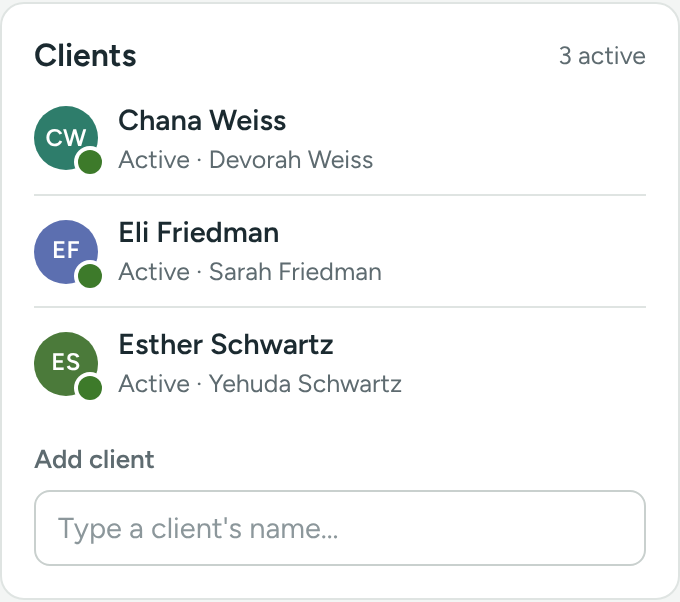
You'll see:
- How many are active, at the top right of the card, for example 4 active.
- Each client's name, with the status shape on their picture, and the word Potential, Active or Inactive.
- The parent or guardian's name.
- A phone button to call the parent or guardian (or the client).
Click a client's name to open their profile.
Add or remove a client
- Add: type the client's name in Add client at the bottom of the card, and pick them.
- Remove: click the × next to the client and confirm.
This is the same link as the client's care team, just from the other side. Changes show on both profiles and are written to both logs.
Matching a new family
You can also start from the client. In the client's Care team card, click Add to team. The list puts Good match therapists first and shows each one's caseload and languages. See Build a client's care team.
Peers and case managers
It works the same way. The Peers and Case managers lists have the same Active clients column, and each profile has a Clients card.
If something is unclear or doesn’t match what you see on screen, tell us and we’ll fix it.